Posts

Showing posts with the label M.2 SSD ENCLOSURE

USB4 Hard Drive Enclosure

Image
After Intel freely opened the Thunderbolt 3 protocol to the USB Association, USB4 data cables, docking stations, hard drive enclosures, and other accessories with the same 40Gbps transmission specification as Thunderbolt 3 emerged, resulting in a higher overall cost-effectiveness. ... Learn more here https://www.ankmax.com/newsinfo/6997671.html

Compact Size & Mac-style

Image
· Aluminum alloy sandblasted shell. Sleek, Durable, and Convenient. Portable yet durable, ideal for traveling. · Slim and pocketable size makes it easy to take around. You can store it into a handbag / backpack / laptop bag, even a pocket. · A perfect companion for your laptop while on the go! ... Learn more here https://www.amazon.com/dp/B0CGRRJLT4/
Image
SSD は 100% 工具不要で取り付けられ、コンパクトでポータブル、プラグ アンド プレイ、ドライバーは不要です。 UC4M3 は、 Ankmax 初の USB 4 対応ポータブル SSD エンクロージャ   です。高速なデバイスを選択すると、作業効率が大幅に向上します。 インストールする方法: 1) エンクロージャを開きます。 2) SSD をスロットに挿入します。 3) 付属のゴム製固定バックルを使用して SSD を所定の位置に固定します。 4) バックカバーをエンクロージャに挿入します。 注意事項 - コンピューターが SSD ケースを認識できない場合。以下の手順に従います。 · 新しい SSD の場合、 SSD を検出して通常に使用するには、ディスクの管理に入り、 SSD を初期化する必要があります。 · USB4 デバイスが Windows PC で認識されない場合は、 PC 製造元の Web サイトにアクセスし、 Windows PC の Thunderbolt ファームウェアとドライバーを最新バージョンに更新してください。 ・上記の操作は公式サイトの製品クイックガイドの手順に従って行ってください。 SSD が正しく動作するには、完全に挿入する必要があります。 ハードディスクが読み取れない場合は、以下の 2 点をご確認ください。 ·まず、 ハードドライブが M.2 PCIe NVME SSD であることを確認してください。 · 次に、   SSD が M.2 インターフェイス スロットに完全に挿入されているかどうかを確認してください。 SSD を 45 度の角度でスロットに押し込む必要があります。 ...... 詳細はこちら   https://www.amazon.co.jp/dp/B0CGRBW1HV/

優れた熱管理

Image
· 耐久性と最大の熱放散を実現する固体アルミニウム構造により、パフォーマンス、信頼性、最高速度の究極の組み合わせが可能になります。 · SSDと貴重なデータの安全を確保するために、短絡、過電流、および多重保護が組み込まれています。 ...... 詳細はこちら https://www.amazon.co.jp/dp/B0CGRBW1HV/

Multi-OS Compatible

Image
· Adopts high-performance controller IC, Complies with UASP, Trim which can effectively improve the speed and extend the lifetime of SSD. · Compatible Multi OS, Windows, Mac OS, Linux, and iPad Pro. ... Learn more here https://www.amazon.com/dp/B0CGRRJLT4/

NVMe M.2 SSD と SSD の互換性のみ

Image
· UC4M3 SSD エンクロージャは、最大 8TB 容量の M Key および B+M Key PCIe NVMe SSD 用に特別に設計されています。適用可能な M.2 SSD サイズは 2280 です。 · SATA SSD 、 mSATA 、または PCIe AHCI SSD とは互換性がなく、 NVMe M.2 SSD のみと互換性があります。 · 大容量の外部ストレージ拡張デバイスは、 Macbook などのデバイスに特に適しています。 ...... 詳細はこちら   https://www.amazon.co.jp/dp/B0CGRBW1HV/

Designed for NVMe M.2 SSD

Image
Supports M key and B+M key interfaces, compatible with four sizes of NVMe SSD: 2230 / 2242 / 2260 / 2280. Single SSD capacity of up to 8TB." Learn more here https://www.amazon.com/dp/B0BS3X2SDM/

Ankmax M2U32C is a high-speed 2bay NVMe M.2 SSD enclosure

Image
Ankmax M2U32C is a high-speed 2bay NVMe M.2 SSD enclosure with offine clone function.The USB 3.2 interface can provide high-speed data transmission up to 10Gbps. Designed for two NVMe M.2 SSD. Read from and write to both SSDs simultaneously! Support mirror copy between two SSDs and Offline Clone function. The aluminum alloy material and 100% tool-free design. Learn more here https://www.amazon.com/dp/B0BS3X2SDM/

A picture to understand the difference between USB4, USB4 v2.0 and Thunderbolt4

Image
A picture to understand the difference between USB4, USB4 v2.0 and Thunderbolt4 The USB-IF organization recently announced the upcoming launch of the USB4 v2.0 specification, which is an upgraded version of the USB4 specification, mainly adding an 80Gbps active cable standard, doubling the speed and making it the fastest interface at present. Counting USB4 v2.0, plus the existing USB 1.1 to USB4, as well as the thunderbolt interface, there are at least six or seven types of USB interfaces that everyone can see. Each standard speed and physical interface are Different, how to distinguish? This makes many people have a headache. Today, through a few comparison pictures, we can clearly compare the differences between the USB and Thunderbolt interfaces of the past dynasties. ... Learn more here https://www.ankmax.com/newsinfo/4460425.html

The new macOS Ventura improves the access security of external

Image
USB/Thunderbolt devicesApple officially released macOS Ventura includes new productivity tools and Continuity features that make the Mac experience better than ever. We encourage all Ankmax users who meet the upgrade conditions to upgrade their Macs to macOS 13 Ventura for the best possible experience. This new OS version has resolved small compatibility issues with external devices, and offers a better user  experience, especially for people connecting USB4 enclosure to their Macs .... Learn more here  https://www.ankmax.com/newsinfo/4559667.html

Comparison of the latest NVMe PCIe5 SSDs

Image
Recently, several SSD manufacturers have released news for their next-generation PCIe Gen 5 SSD controllers, including Phison (E26), Silicon Motion (SM2508), Samsung (PM1743), InnoGrit (IG5666) , Marvell (MV-SS1331 and MV-SS1333) and Japanese of Kioxia, ect manufacturers, They are all actively developing PCIe 5.0 SSD master control. In the future, we are expected to see the latest PCIe Gen 5 SSDs in the high-end product lines of Samsung, ADATA, APACER, TeamGroup, Kioxia, Corsair, Seagate, WD and other manufacturers. ... Learn more here https://www.ankmax.com/newsinfo/4288990.html

A New PCIe 5.0 M.2 2280 4TB SSD Launched - Gigabyte Aorus Gen5 10000

Image
Up to 10GB/s read speed, with Phison PS5026-E26 controller Samsung just launched its highly anticipated 990 Pro series of SSDs. These are high-performance NVMe M.2 2280 SSDs "optimized for gaming and creative applications." Ahead of this launch, there were indications that Samsung's 990 Pro series SSDs would feature a PCIe 5.0 interface; however, this has yet to materialize. The new Samsung 990 Pro series SSDs use the PCIe 4.0 interface. The sequential read and write speeds of the 990 Pro SSD are up to 7,450 MB/s and 6,900 MB/s, respectively, and the IOPS performance figures are 55% higher than the 980 Pro SSD. ... Learn more here https://www.ankmax.com/newsinfo/4270887.html

Samsung の次世代 990 PRO PCIe Gen 5.0 M.2 SSD は 13,000 MB/秒に達し、ストレージ速度を新たな高みへと押し上げます

Image
Samsung 990 Pro は、PCI-SIG Web サイトで以前に公開された PCIe 5.0 速度をサポートする最初の消費者向け NVMe SSD になります。 1 TB モデルと 2 TB モデルの 2 つの SSD 構成があり、Samsung 独自のソリューションを使用して次世代 SSD ソリューションを強化します。 ...... 詳細はこちら https://www.ankmax.com/newsinfo/3625988.html

Samsung's next-generation 990 PRO PCIe Gen 5.0 M.2 SSD can reach 13,000 MB/s, pushing storage speed to new heights

Image
The Samsung 990 Pro will be the first consumer NVMe SSD to support PCIe 5.0 speeds, previously disclosed on the PCI-SIG website. We saw two SSD configurations, the 1 TB and 2 TB models, which will use Samsung's own proprietary solutions to power its next-generation SSD solutions. ... Learn more here https://www.ankmax.com/newsinfo/3625988.html

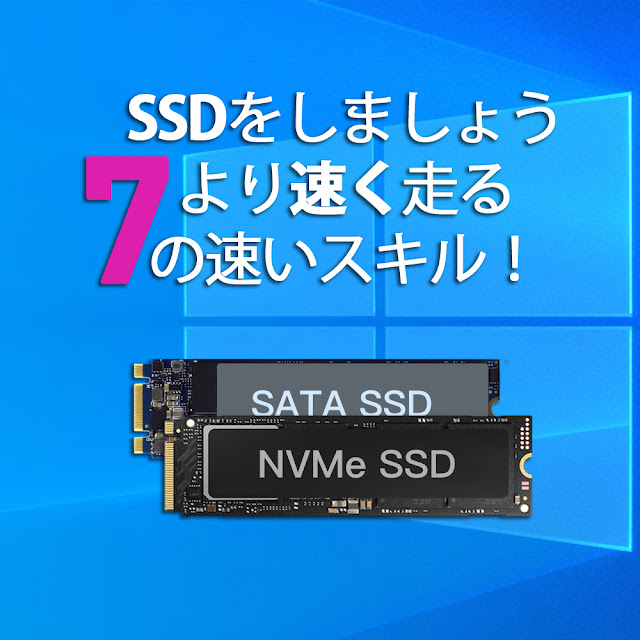
SSDをより速く実行するための7つのクイックヒント!

Image
「ソリッドステートドライブ(SanDisk Ultra 2 SSD)の起動に時間がかかりますが、今ではほとんどHDDのようです。私のゲームはますますゆっくりとロードされています。これを修正してOSを再インストールすることは可能ですか?または他に何ができますか?」 コンピューターでSSD(ソリッドステートドライブ)を使用したことがある場合、特にSanDiskまたはSamsung SSDがほぼいっぱいになると、速度が低下するため、同様の問題が発生する可能性があります。そうすると、アプリやプログラムを開いたりロードしたりするのに時間がかかることがわかります。さらに悪いことに、それは時々凍結の問題を引き起こします。今、あなたはおそらく尋ねているかもしれません:SSDはより速く動くことになっているのではないですか?WindowsコンピューターでSSDの速度を低下させるための実行可能な解決策はありますか?答えはイエスです。 7 Windows 11/10/8/7でSSDをより高速に実行するための簡単なコツ Windows 7、8、8.1、10、または11ベースのコンピューターで使用しているソリッドステートドライブに関係なく、Samsung、SanDisk、Kingston SSD、その他の有名なソリッドステートドライブなど。次の7つのヒントは、SSDの低速の問題を解決するのに役立ちます。 (例として、Windows10がこれをどのように処理するかを見てみましょう。これらの方法は、Windows 7/8 /8.1でも機能します) ...... 詳細はこちら https://www.ankmax.com/newsinfo/2808150.html

7 Quick Tricks to Make SSD Run Faster

Image
“My Solid-state drive boot times are getting progressively longer, to the point now it's pretty much like an HDD. My loading for games are becoming slower and slower. Is the fix for this to reinstall the OS or is there something else I can do?” If you have used an SSD (solid-state drive) on your computer, you might experience similar issues as SanDisk or Samsung SSD slow especially when it is almost full. Then you will find it takes a longer time to open or load any apps/program. What's worse, sometimes it causes freezing problems. Now you might probably be asking: Isn't SSD supposed to run faster? Is there any feasible solution to SSD slowing down in Windows computers? The answer is yes. 7 Quick tricks to make SSD run faster in Windows 11/10/8/7 No matter which solid-state drive, like Samsung, SanDisk, Kingston SSD or another famous one, you are using on Windows 7, 8, 10, or 11 system-based computers, the below 7 tricks can help with SSD running slow problem. (We will tak...

いつ必要ですかSSDアライメントWindows 10/11?

Image
SSDはデータを保存するためにファイルシステムで最小の4Kセクターを採用しているため、SSDアライメントは主にSSDパーティションの4Kアライメントを指します。最小の4K割り当てユニットがSSDの4Kページと常に一致していない場合、SSDのパフォーマンスに影響を与える可能性があります。4Kアライメントは、高度なフォーマットのメカニカルハードディスクでも広く使用されています。4Kアラインされたパーティションは、オペレーティングシステムにより優れたサービスを提供し、より高いパフォーマンスを提供します。クローン作成後にWindows10を調整する必要がある場合があります。 SSDの位置合わせが正しくないことを示す兆候がいくつかあります。たとえば、既知の小さなファイルがデータパーティションの大容量ディスクストレージを占有したり、ハードドライブをSSDにアップグレードしただけでも、システムプログラムやアプリケーションの実行速度が低下したりします。このまま続けると、不要な書き込み操作が大幅に増え、SSDの寿命が短くなります。 ...... 詳細はこちら https://www.ankmax.com/newsinfo/2806056.html

When do you need SSD alignment in Windows 10/11?

Image
SSD alignment mostly refers to SSD partition 4K alignment because SSD adopt the smallest 4K sector in file system to save data. If the smallest 4K allocation units are not always aligned with the 4K pages in SSD, the performance of SSD could be affected. 4K alignment also is widely used in advanced formatted mechanical hard disk. 4K aligned partition better serves operating systems and offers higher performance. One may need to align Windows 10 after clone. There are some signs that show your SSD alignment not OK. For instance, known small file occupies large disk storage in data partition, or system programs and applications run slowly even if you just upgrade hard drive to SSD. If things continue this way, the number of unnecessary writing operations will increase dramatically, which shortens SSD lifespan eventually. ... Learn more here    https://www.ankmax.com/newsinfo/2806056.html

NVMe PCIe Gen4 SSDコントローラーのパフォーマンス比較

Image
現在のところ、PCIe Gen 4 SSDコントローラーを製造できる市場のメーカー、ただし、SamsungおよびSanDisk(WD)のメインコントローラーに「自己生産および自己使用」に属します。残りのブランドは独自のソリューションを立ち上げました、ストレージメーカーが使用するため。これらのベンダーには、Phison、Innogrit、SMI、Marvellなどが含まれます。2019年に発売されたPCIe4.0M.2 SSDの最初のバッチはすべて、Phison PCIe 4.0 M.2 SSDソリューションを使用します。PCIe4.0×4帯域幅を完全に利用できないことに加えて、28nmプロセスは比較的高い電力消費をもたらしますと発熱高い。 ...... 詳細はこちら  https://www.ankmax.com/newsinfo/2800942.html

NVMe PCIe Gen 4 SSD Controller Performance Comparison

Image
At present, the manufacturers on the market that can manufacture PCIe Gen 4 SSD controllers, Except that Samsung and SanDisk (WD) belong to the main controller "self-produced and self-used",The rest of the brands have launched their own solutions for storage manufacturers to use.These vendors include Phison, Innogrit, SMI, Marvell, and more. The first batch of PCIe 4.0 M.2 SSDs to be launched in 2019 all use the Phison PCIe 4.0 M.2 SSD solution. In addition to the inability to fully utilize the PCIe 4.0×4 bandwidth, the 28nm process also results in relatively high power consumption and heat generation high. ... Learn more here https://www.ankmax.com/newsinfo/2800942.html